
Asterisk Connector Diagnostic Cheatsheet
Purpose
This document is not a full troubleshooting guide. It is a quick technical reference for developers and support engineers who already have access to the system and need practical diagnostic commands.
Tools
Asterisk CLI
The Asterisk CLI is the main interface for inspecting runtime state, SIP/PJSIP objects, active calls, channels, modules, and debug output.
| Command | Goal |
/usr/sbin/asterisk -r |
Connect to the running Asterisk CLI |
/usr/sbin/asterisk -rvvv |
Connect with more verbose output |
core show help |
Show available CLI help |
core show help pjsip |
Search for PJSIP commands |
exit |
Exit the CLI |
The Asterisk CLI supports command completion with the Tab key, and commands may only be available when the related module is loaded.
References:
- https://docs.asterisk.org/Operation/Asterisk-Command-Line-Interface/CLI-Syntax-and-Help-Commands
- https://docs.asterisk.org/Development/Debugging/CLI-commands-useful-for-debugging/
Packet capture tool
Use the packet capture tool in CoCoS when SIP messages are not visible in Asterisk, when RTP traffic should be checked, or when you need to prove whether traffic reaches the server.
Use cases:
- Check whether packets reach the server.
- Check REGISTER and authentication responses.
- Check INVITE flow and response codes.
- Check RTP traffic direction and ports.
See the following documentation on how to start a packet capture: https://docs.cocos.software/books/cocos/page/how-to-start-a-packet-capture
SIP message viewers or syntax highlighters
SIP messages can be difficult to read as plain text. A SIP-aware viewer or syntax highlighter can make INVITE, REGISTER, ACK, BYE, headers, status codes, and call identifiers easier to inspect.
Options:
- sipgrep - https://github.com/sipcapture/sipgrep
- Wireshark ( from packet captures ) - https://wiki.wireshark.org/SIP
- vscode extension - https://marketplace.visualstudio.com/items?itemName=rlugtigheid.sip-protocol-highlight
Status Checks
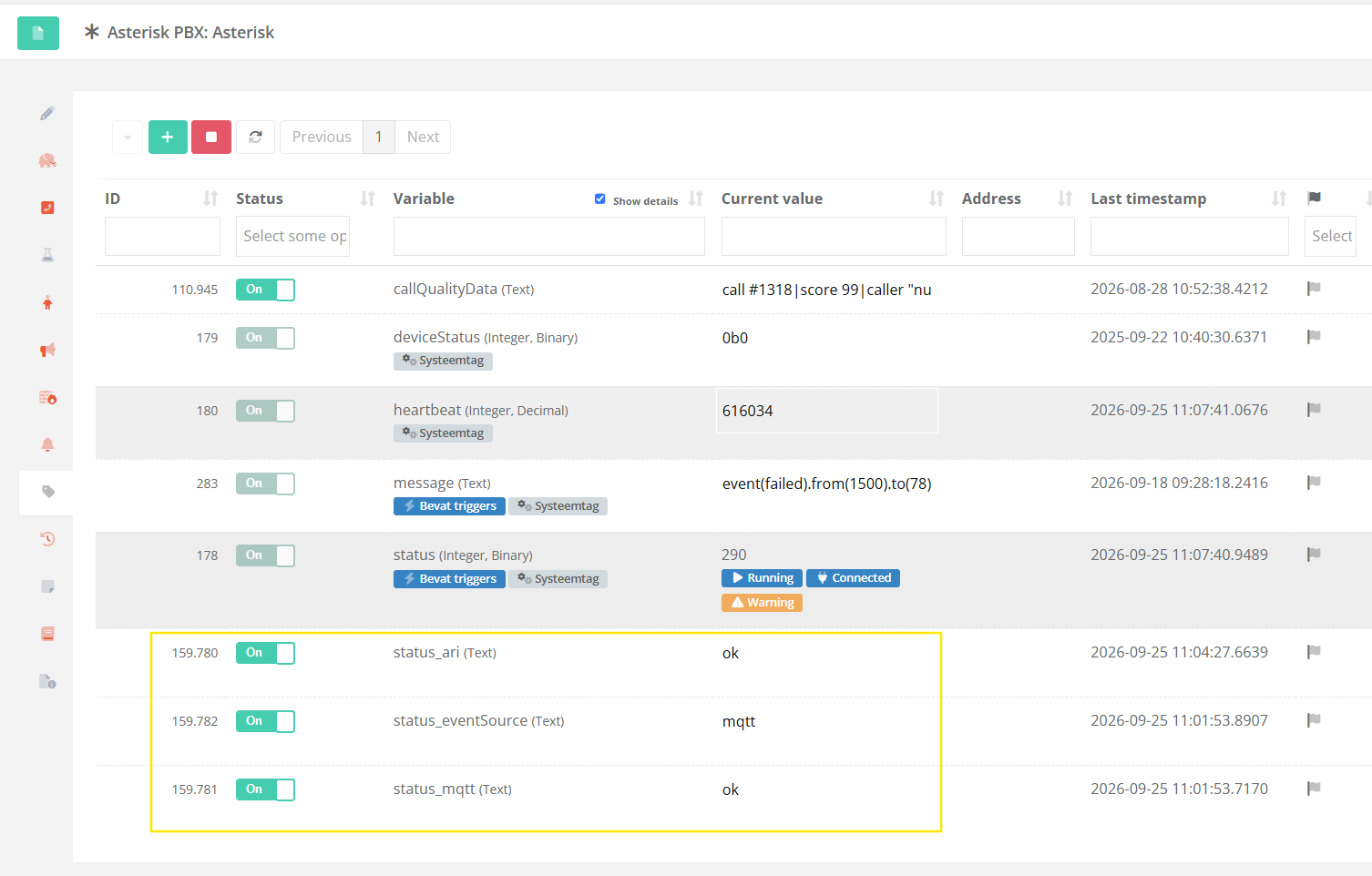
Check status tags
In Asterisk Connector >= v5.4.6 there are extra status tags that inform specific statuses:
Configuration Checks
The following commands should be executed on the Asterisk CLI.
Connect using: /usr/sbin/asterisk -r
Check endpoints
| Command | Goal | Expected result |
pjsip show endpoints |
Show all endpoints | The expected endpoint is listed. |
pjsip show endpoint <endpoint-name> |
Show one endpoint | Endpoint details are displayed. |
pjsip show auths |
Show auth objects | Expected authentication object is listed. |
pjsip show auth <endpoint-name> |
Inspect auth object | Authentication object exists and is linked to the endpoint. |
Incorrect behaviour:
Unable to find object <endpoint-name>.Possible causes:
- Endpoint name is incorrect.
- Connector did not configure endpoint.
- Create event not received.
- Unable to read endpoint from CoCoS.
- PJSIP module is not loaded.
- Realtime configuration does not contain the expected object.
Check transports
| Command | Goal | Expected result |
pjsip show transports |
Show active (SIP) transports | Expected UDP, TCP, TLS, or WebSocket transport is listed. |
pjsip show transport <transport-name> |
Inspect transport details | Bind address and protocol match the expected setup. |
Incorrect behaviour:
No objects found.Possible causes:
- Transport configuration is missing.
- Transport failed to load.
- Asterisk was not reloaded after configuration changes.
- For TLS: Certificate file configured does not exist.
Check contacts and registrations
| Command | Goal | Expected result |
pjsip show contacts |
Show contacts | Registered devices or trunks are visible. |
pjsip show registrations |
Show registrations | Outbound registrations are visible if used. |
Incorrect behaviour:
Contact: <endpoint>/sip:<address> UnavailablePossible causes:
- Device is not registered.
- Device is registering to the wrong address.
- Firewall or routing issue.
- Transport mismatch.
- Authentication failure.
- Registration expired.
Log Checks
| Command | Goal |
grep "Asterisk Connector" /var/log/cocos-syslog.log |
Grep connector specific logs. |
tail -f /var/log/cocos-syslog.log | grep "Asterisk Connector" |
Open realtime connector log. |
SIP Message Checks
Use SIP message logging when you need to see protocol-level behaviour.
Enable SIP logging
When connected to the Asterisk CLI run the following command to enable SIP Message logging:
pjsip set logger onGetting SIP Messages
After enabling SIP Message logging the messages are shown in the CLI connection and logged to /var/log/syslog.
| Command | Goal |
grep -E "<--- (Received|Transmitting) SIP (request|response)" /var/log/syslog |
Grep SIP Message logs from syslog. |
tail -f /var/log/syslog | grep -E "<--- (Received|Transmitting) SIP (request|response)" |
Open realtime SIP Message log. |
<grep command> | sed 's/#015#012/\n/g' |
Replaces encoded newline characters in SIP Message log output with actual newlines for better readability. |
Or even better, use the sipgrep tool for easier filtering and better output.
| Command | Goal |
sipgrep /var/log/syslog |
Grep SIP Message logs from syslog. |
tail -f /var/log/syslog | sipgrep |
Open realtime SIP Message log. |
sipgrep --help |
Show filter & output options. |
References
- Asterisk CLI Syntax and Help Commands - https://docs.asterisk.org/Operation/Asterisk-Command-Line-Interface/CLI-Syntax-and-Help-Commands
- Asterisk PJSIP Troubleshooting Guide - https://docs.asterisk.org/Configuration/Channel-Drivers/SIP/Configuring-res_pjsip/Asterisk-PJSIP-Troubleshooting-Guide